Why do we take pictures? For the majority of us, I’d guess it falls somewhere into the realm of, enjoyment and/or documentation. Regardless of the medium, whether it be digital or film, we like to preserve moments and may enjoy trying to do so with some level of artistry. Isn’t it nice when someone says, “wow, that is cool!” or “how did you get your picture to look like that?” Simply put, many of us enjoy taking pictures because we like to and it’s nice when that is noticed or appreciated. Add in a few cool tools and enjoyment can turn into excitement from behind the lens.
Tag Archives: photography
*Free Photoshop Contrast Pop Action!
Here is a brief tutorial on how to add a contrasty “look” to just about any picture. There are sites out there to purchase many of these types of actions, and some of them are well worth the price, but I’ve found that through my years, many other photographers have offered up free advice as I was learning to scrape the surface of Photoshop, which enabled me to gain a deeper understanding of my post processing. So, in this tradition, I shall try to pay back a bit of that help by offering up this little trick. I know that many photographers would rather spend their free time taking pictures, not in front of a computer processing them. I myself find enjoyment on both sides of this coin, but I sure don’t mind being able to quickly automate some of my more “used” techniques. This is one of them…
*A thank you to many, or, why I think the internet is cool.
First, thank you. To those of you who’ve been visiting, reading and commenting and those who have been linking me to their blogs, articles, allowing me to guest blog for you, re-posting my blog posts, and generally helping each other out, thank you. If you are here, reading this, I mean you.
The internet is an amazing tool for information gathering. Sometimes that information can be challenged and in some cases, just downright wrong, but the fact that it is a tool that enables all of us to provide the dialogue, has gone a long way in helping me in a variety of ways. I wanted to take the opportunity to thank a few of the folks who’ve helped my blog gain a little exposure and hope to be able to turn a few of my new friends onto their sites as well. Many of the links below may be well known to many of us, others perhaps not, but regardless, I find a lot of value in these sites and hope that others may as well if you don’t already…
*G-FD’d Up From the Feet Up! (or, how I saved thousands buying FD lenses)
Recycle, reuse, reshoot. As long as you don’t mind manually focusing and establishing your exposure, why pay a ton of money when there are so many used, high quality lenses available? Sure there are many optical and automated benefits to modern lenses, but sometimes, for the money saved, I can deal with the shortcomings of older, out of date lenses. Using older, “legacy” glass on multiple cameras, either via a proprietary mount or adapter, can provide a fun, reasonably affordable and beneficial experience… Continue reading
*Photography vs Art
Where does a photograph stop being a photograph and start becoming something different? We’ll call it an ‘artistic interpretation’ for lack of a better description. Or, are they one in the same no matter what level of manipulation has been applied? I’ve been taking pictures for a while, more of my life than not if you don’t count the hiatus I took after college when I was bogged down with three jobs. I still have some shots from that time period, but they are few and far between. So, I feel like photography has been a part of my life for a while. I’ve not spent too much time thinking about it in these terms until recently. Prior, I’ve just enjoyed taking pictures but thanks to the internet and my epiphany that there are other people out there with opinions getting me to challenge my personal understanding, I feel like it is an entertaining idea to explore. Is anything done to a photograph, after an image has been captured, by way of any kind of manipulation actually doing something that betrays the purity of photography, or is it just part of the progression? Well… let us explore. Continue reading
*TRP in the New York Times – Gadgetwise
Rik Fairlie from the New York Times had gotten in touch with me a few weeks back regarding my experience with the micro 4/3’s system. We chatted for a little bit about the pros and cons and he was nice enough to mention me in his article for the Gadgetwise section last week. I’ve not been quoted in a publication before so it is weird to see my name affiliated with an article like this. Kinda like hearing your own voice on your answering machine, I guess if I could go back, I might have answered some of the questions a little differently, more eloquently perhaps. Regardless, thank you very much to Rik for tracking me down and for those who’d like to read the article, it is here!
*The 5 minute Greenberg Treatment.
For those who do not know, Jill Greenberg is a famous photographer to the stars. Some of her work has received, uh, criticism, for her use of light or tactics to achieve certain reactions with, or effects on her subjects (see the crying babies in her ‘End Times‘ series, or the now famous John McCain shoot). I call it art, but I do fall on the crass, perhaps cynical side of the human spectrum. Regardless of your personal feelings toward her, the lighting she uses is dramatic. Her style has been duplicated by many a strobist and comes about by a pretty easy to replicate setup. Now, to do it well, is a bit trickier but we gotta start somewhere right? Read on for a quick light set-up and easy to follow post processing technique. Continue reading
*A big Thank You to Eric at Photography Bay!

visit Eric at http://www.photographybay.com
Eric Reagan from Photography Bay was looking for guest bloggers as he was taking an ‘easier’ week (any readers know how much time they spend on content over there), and as luck would have it, he decided to graciously use my submission. Thank you to Eric and the PB team for featuring my post on complimentary color. As my blog is just starting to get some legs underneath it and attempting to crawl from its infancy, I have been amazed by the community and camaraderie issued by so many other photographers and blog authors. I hope to be able to contribute a bit from time to time and if able, provide a bit of promotion to other hard working photogs. For those who’ve stumbled upon me here from PB, thanks for stopping by and I hope that I am able to provide a little reading and insight. Please feel free to stop back by as I’ve got a few goodies coming up and hope to soon have a comprehensive catalog of tips, techniques, reviews and easy to follow tutorials helping all of us become better photographers, myself included fingers crossed. Thanks again Eric, your generosity offering those of us, that don’t have the readership that your site has, the opportunity is much appreciated. And, for my readers that don’t already know about and follow Photography Bay, I’d certainly suggest it, I stop by every day and enjoy the insight it provides.
Happy shooting all.
Tyson
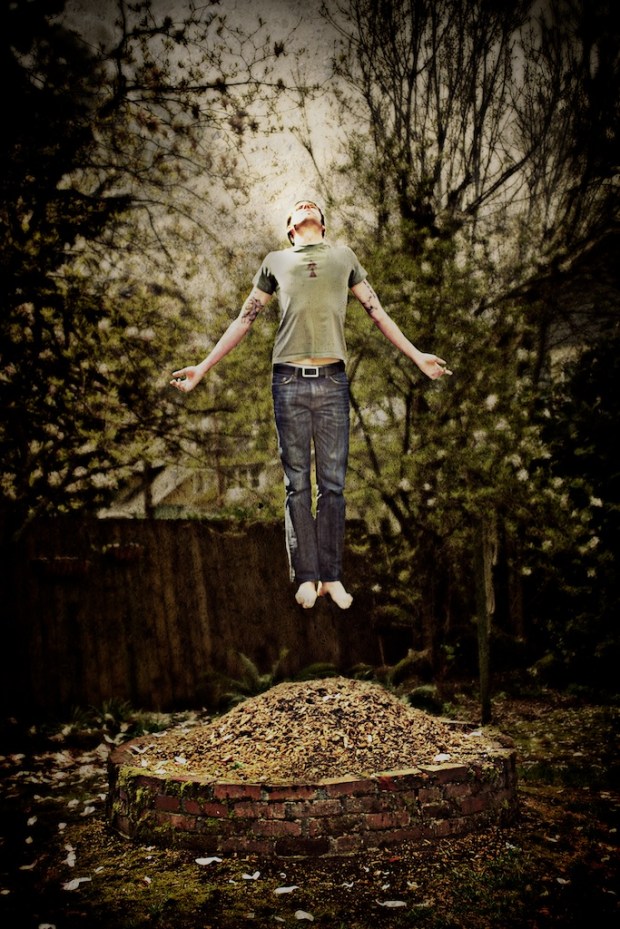
*Floating in Photoshop! How to levitate in a photo.
*Wanted to thank everyone who has stopped by to read this post over the last few years. I’ve received quite a few emails and seen links back to this article from many different forums based in many different countries. Thank you! As originally mentioned in the tutorial below, this isn’t a particularly original tactic, but if you put your own spin on it, it can produce some really cool imagery. Okay, on to my original posting, and thank you again for everyone who has stopped by. I’ve been really excited to converse, learn and meet with many of you since I started this blog over three years ago!
Enjoy,
Tyson
This is not an original idea, but so few ideas are anymore. While it may be a well used tactic, it can be very effective. I’ve played around with this technique a few times and it is one that when done decently will almost always get a “wow!” or at least a “huh, wait, what?” It is easy to do as well. It requires Photoshop, or if you are fundamentally against paying $600 for software you can download GIMP. I’ve used Photoshop for this one, so if using GIMP, you will need to translate these steps into GIMP-speak which shouldn’t be too hard.
Okay, our goal is to appear to be floating, or hovering so unless you’re an accomplished zen levitation master, you will need to take two pictures to create the illusion.
*A photographic study in color, Henri Matisse style.
Henri Matisse (1869-1954) is known for being one of the originators of the Fauvist style where contemporary impressionist rendition gave way to bold color and hard lines. His use of complementary colors and shape provided a twist on traditional French painting. While Fauvism was seen by some to be untrained and wild by comparison to contemporary style at the turn of the century, the use of vibrant, expressive colors enabled Matisse to direct the viewers eye through his canvas leading his viewer’s attention where he wanted it.
I’d like to play with the idea of utilizing complementary color using photography as our medium.


