At first glance, Topaz Clean 3 seems like a simple, straightforward plugin. A few presets give you distinct looks which blur detail anywhere from slight to cartoony. If utilized properly, it can provide a great skin softening plugin, or an abstract, artistic pixel obliterator. Coming in at under thirty bucks, it might just be the plugin you didn’t know you were looking for.
Author Archives: tyson robichaud photography
*A quick, simple and free Vignette Action
This is a quick and easy action which I use often. While so many photographers (myself included) spend time and money in software to correct for light falloff, I like to go the other direction and introduce it sometimes. Of course, there are times and places where a darkened vignette doesn’t make sense, and that time, and cost spent to correct it come into play, but for the times you’d like to delicately direct attention to a specified area, this action can help that happen. Also, you can completely determine the “shape” of the vignette to suit the frame. C’mon in and see the difference a vignette can make.
*Snap Art 3, unleash your inner artist!
Anyone familiar with my blog knows I’m a fan of artistic, digital image file manipulation. Be that through actions, plugins or standalone software, I like to use my pictures in a variety of different ways. One thing I’ve always wanted to be better at, but was never able to hone my skill, is painting. So, into my life fell digital photography, but there was that tactile, artistic void left behind. I have tried Corel’s Painter, which is an amazing program, but one that requires just short of a masters degree to fully understand, and is in my opinion much better utilized by those who are already decent actual painters. Well, I’ve always wanted to be able to finely tune, and offer digital painting as a conversion for a digital picture file both personally and professionally, and until I tried my hand at Alien Skin’s Snap Art 3, I had resigned myself to putting it on the bucket list. A plugin for either Photoshop or Lightroom, the seamless and intuitive interface can help you produce digital paintings and drawings with a variety of media in a matter of seconds. Read on for initial feelings and examples…
*Establishing Hyperfocal distance! You mean like manually focusing?
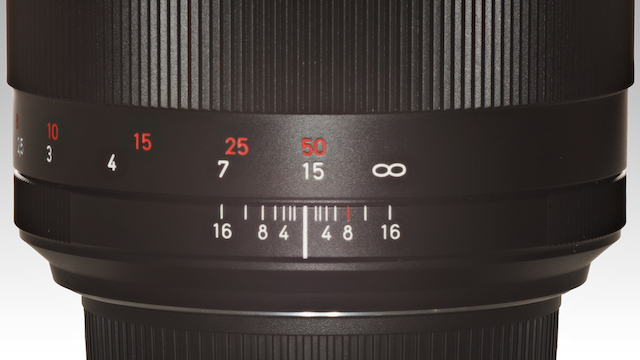
The hyperfocal distance at a given aperture on any lens will enable the photographer to “know” what will be in focus in the scene without having to re-focus between shots. Hyperfocal distance is commonly defined as “the closest distance from which a lens can focus that will be acceptably sharp from half that distance through infinity.” It is a technique which is particularly useful with smaller apertures (as in gaining a deeper depth of field) when shooting anything from street scenes to landscapes where the photographer requires an established area of focus from a fixed distance through infinity so that you don’t need to refocus between shots. Follow me in and we’ll go over a simple way to determine your hyperfocal distance.
*WILL WORK FOR FUN! Your questions about life, love and photography, answered.
Do you want to know more about a particular technique? Are you curious about purchasing a particular camera or lens? Do you ever see an image and wonder “how do they do that?” Ask away, I will do my best to answer anything you can think of, or at least find someone and direct you to who can. I enjoy all of the email I get, and do my best to answer each of them as accurately as I’m able. So, I thought, “why not try and open this up so that everyone can enjoy and benefit?” As summer comes into focus, I’m finding my time being stretched in quite a few different directions, juggling projects and life, so let me know what you are interested in and I’ll do the leg work. Hopefully we can all learn something along the way! Go ahead and drop a comment below, or email me and I will answer them/showcase them as they come in. Read on…
*HDR 101, Part 2 – Processing Dynamic Range
We’ve been out capturing dynamically diverse scenes in Part 1 of the HDR 101 series, now we get them onto the computer and realize that there are a variety of ways to achieve our vision. From free-ware to thousands of dollars worth of software, there are options. Some are better than others, and some offer a better bang for the buck (in my opinion). Regardless, most all HDR software out there will offer you a free trial, so you can decide which works better for your vision. That said, here are a couple techniques using Photoshop, Everimaging HDR, and a very popular HDR software, Photomatix, along with discount codes if you choose to purchase 🙂 Read on for more…
*Mr and Mrs Squeeze wine down with a trip to Oregon Wine Country.
Now, I know this is a photography blog, but with the smell of damp earth in my nose and the invitation of blue skies, I felt the need to momentarily transform this into a travel blog, kinda. Mrs Squeeze and I have been looking forward to our first joint, private overnight outing since the birth of Little Baby What’s-his-face just over 19 months ago. This last weekend, we achieved our goal and finally severed the cord. LBWHF did just fine, by the way. Didn’t miss us one bit, so ends up it was his parents that were challenged by the perceived attachment issue.
Anyway, on to our little adventure and I’ll try to talk a bit about photography along the way just to maintain the greater theme…
*HDR 101, Part 1 – Capturing Dynamic Range
Politics, Religion, Economics, HDR. There seems to be little in the photographic world that starts such heated discussions as the concept of HDR photography and processing. Truth of the matter is, it is a very popular technique and can be done with a multitude of results, some more visually shocking than others, but I believe HDR gets a bad rap too often. Let me start off by saying, I am not an HDR expert. I do not feel that my techniques are an end all by any means, but I have figured out some very helpful techniques that I feel can benefit those looking to get into, or better understand capturing and processing HDR imagery. For me, capturing the dynamic range of a scene is the primary concern while the way these bracketed images are processed is an entirely personal decision. Too often, I see people tonemapping single images, or running them through an HDR-like software to give it that grungy, gritty look and calling it “HDR.” While many of those images have a very cool look to them in their own right, it still doesn’t quite qualify as a high dynamic range photo by definition in many cases. C’mon in and we can discuss ways to capture the whole dynamic range of any particular scene along with some tips and tricks.
*Photovision 2011 discount!
Well, the last time I posted the photovision discount I wasn’t sure if the purchaser would be purchasing the 2010 series (which I found to be very informative, but a little repetative) or the upcoming and recently started 2011 series which has added some real working pros that I’ve actually heard of along with more content per disk.
For those not familiar with Photovision, it is a series of 6 issues on DVD that includes behind the scenes interviews and over the shoulder shooting while professional photographers ply their trade. Some of the information involved in the 2010 season has been invaluable. There were a couple “participants” that I was getting rather tired of listening to toward the end, but they’ve lost a few of those folks and added contributors like Joel Grimes who, is a badass. For this alone, I am completely stoked on this new season. By clicking on the following link and entering the promo code “PVFAN” you too can receive the 6 DVD series (2.5 – 3 hrs per DVD) for a 75% discount! Normally $199, using the link and code will drop it down to $49.
http://fansof.photovisionvideo.com/Tyson/050081
If you are interested in setting up your own photo business, have your own business or just enjoy watching working photographers as they shoot and share their settings, techniques, marketing tactics, post production tricks and trade secrets, it is well worth it. I have already signed up for 2011. I won’t lie, I get entered into a drawing for a 5DmkII for each subscription that is purchased through my link, so I’d be greatly in debt to anyone who is interested purchasing through this link, but regardless, I do think it is a worthwhile, educational and entertaining investment and wouldn’t be posting this if I felt otherwise, promise 🙂
Happy shooting,
Tyson
*Free Bleach Bypass photoshop action.
Bleach Bypass is a fun way to add contrast and moodiness to an image. Because of the way it renders luminance, it tends to flatter skin tones in that it will push the highlights a bit which, if controlled, can produce nice, smooth skin.
Used in color film processing where the bleach portion was skipped, resulting in the emulsion retaining the silver and color dye in the process, it produces high contrast images with muted colors. Digitally, it can be reproduced by layering a black and white duplicate over the color image and adjusting the blend mode in photoshop…