*Snap Art 3, unleash your inner artist!

Anyone familiar with my blog knows I’m a fan of artistic, digital image file manipulation.  Be that through actions, plugins or standalone software, I like to use my pictures in a variety of different ways.  One thing I’ve always wanted to be better at, but was never able to hone my skill, is painting.  So, into my life fell digital photography, but there was that tactile, artistic void left behind.  I have tried Corel’s Painter, which is an amazing program, but one that requires just short of a masters degree to fully understand, and is in my opinion much better utilized by those who are already decent actual painters.  Well, I’ve always wanted to be able to finely tune, and offer digital painting as a conversion for a digital picture file both personally and professionally, and until I tried my hand at Alien Skin’s Snap Art 3, I had resigned myself to putting it on the bucket list.  A plugin for either Photoshop or Lightroom, the seamless and intuitive interface can help you produce digital paintings and drawings with a variety of media in a matter of seconds.  Read on for initial feelings and examples…
Continue reading

*Establishing Hyperfocal distance! You mean like manually focusing?

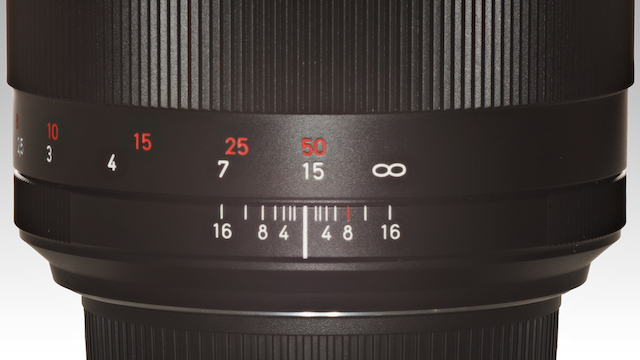
The hyperfocal distance at a given aperture on any lens will enable the photographer to “know” what will be in focus in the scene without having to re-focus between shots.  Hyperfocal distance is commonly defined as “the closest distance from which a lens can focus that will be acceptably sharp from half that distance through infinity.”  It is a technique which is particularly useful with smaller apertures (as in gaining a deeper depth of field) when shooting anything from street scenes to landscapes where the photographer requires an established area of focus from a fixed distance through infinity so that you don’t need to refocus between shots.  Follow me in and we’ll go over a simple way to determine your hyperfocal distance.

Continue reading

*WILL WORK FOR FUN! Your questions about life, love and photography, answered.

Do you want to know more about a particular technique?  Are you curious about purchasing a particular camera or lens?  Do you ever see an image and wonder “how do they do that?”  Ask away, I will do my best to answer anything you can think of, or at least find someone and direct you to who can.  I enjoy all of the email I get, and do my best to answer each of them as accurately as I’m able.  So, I thought, “why not try and open this up so that everyone can enjoy and benefit?”  As summer comes into focus, I’m finding my time being stretched in quite a few different directions, juggling projects and life, so let me know what you are interested in and I’ll do the leg work.  Hopefully we can all learn something along the way!  Go ahead and drop a comment below, or email me and I will answer them/showcase them as they come in. Read on…

Continue reading

*HDR 101, Part 2 – Processing Dynamic Range

My final result

We’ve been out capturing dynamically diverse scenes in Part 1 of the HDR 101 series, now we get them onto the computer and realize that there are a variety of ways to achieve our vision.  From free-ware to thousands of dollars worth of software, there are options.  Some are better than others, and some offer a better bang for the buck (in my opinion).  Regardless, most all HDR software out there will offer you a free trial, so you can decide which works better for your vision.  That said, here are a couple techniques using Photoshop, Everimaging HDR, and a very popular HDR software, Photomatix, along with discount codes if you choose to purchase 🙂  Read on for more…

Continue reading

*HDR 101, Part 1 – Capturing Dynamic Range

the scale of luminance values as far as the eye can see…

Politics, Religion, Economics, HDR.  There seems to be little in the photographic world that starts such heated discussions as the concept of HDR photography and processing.  Truth of the matter is, it is a very popular technique and can be done with a multitude of results, some more visually shocking than others, but I believe HDR gets a bad rap too often.  Let me start off by saying, I am not an HDR expert.  I do not feel that my techniques are an end all by any means, but I have figured out some very helpful techniques that I feel can benefit those looking to get into, or better understand capturing and processing HDR imagery.  For me, capturing the dynamic range of a scene is the primary concern while the way these bracketed images are processed is an entirely personal decision.  Too often, I see people tonemapping single images, or running them through an HDR-like software to give it that grungy, gritty look and calling it “HDR.”  While many of those images have a very cool look to them in their own right, it still doesn’t quite qualify as a high dynamic range photo by definition in many cases.  C’mon in and we can discuss ways to capture the whole dynamic range of any particular scene along with some tips and tricks.

Continue reading

*Kubota Lensbaby Action Pak!

1 photo, 15 actions for 15 different looks. (click on all pics for larger view)

With all the Lensbaby fun of late, I went in search of ways to enhance the Lensbaby experience and stumbled across the Kubota Lensbaby Action Pak!  For those not familiar with Kubota actions, they’re purchasable groups of photoshop actions (very popular with studio, event and wedding shooters) which provide you with quick, easy and repeatable adjustments with the click of a button.  Based in Bend, Oregon, they’re just down the way from me so I decided to get in touch with them and they were very gracious to let me play around with their Lensbaby Action Pak which includes 15 actions tuned for image files taken with various Lensbaby optics.  As they say, a picture is worth a thousand words, and while I never have a problem rambling on and on, I will let the image examples show off what these actions do.  Starting with the original image taken with a GF1 and the Lensbaby TT + Composer / double glass optic and on through each of the included 15 Kubota Filters:

Continue reading

*30% off Alien Skin Software!!!!!!!!

(*while this is the older promotion, Alien Skin is currently offering a 30-40% off sale on all their software through April 17th, 2012 SEE HERE!)

I’m not the type to promote every discount or product out there (just the ones that I like), but having been fortunate enough to review a couple of the Alien Skin software products recently, I will say that A) they are a cool company with great folks representing them and B) they make a killer product.   That and I wanted to pass this along just in case anyone out there reading is interested.  I make no money from this and I’m honestly just passing this along because I like the folks involved with, and products offered from Alien Skin.

That’s all really.  If you’ve been interested in any of the Alien Skin software and haven’t pulled the trigger, they’re offering 30% off (and free updates/not upgrades mind you) until Tuesday March 15th.  If you’re interested in what I’ve had to say about them, you can read my personal experiences via the links below:

Alien Skin Exposure 3

Alien Skin Bokeh 2

I’ve not played around with the others yet, but I’m sure that any Alien Skin product would be worth while as long as it’s particular skill set appealed to you.  I would very strongly suggest at least trying out the free trials of both Exposure and Bokeh if you’ve not already to see if the discount rate is enough to push you.

You can download the trials or purchase any of the Alien Skin software directly from their website here: Alienskin.com

Have a great weekend!

Tyson

*Lensbaby’s sweet, ‘Sweet 35’

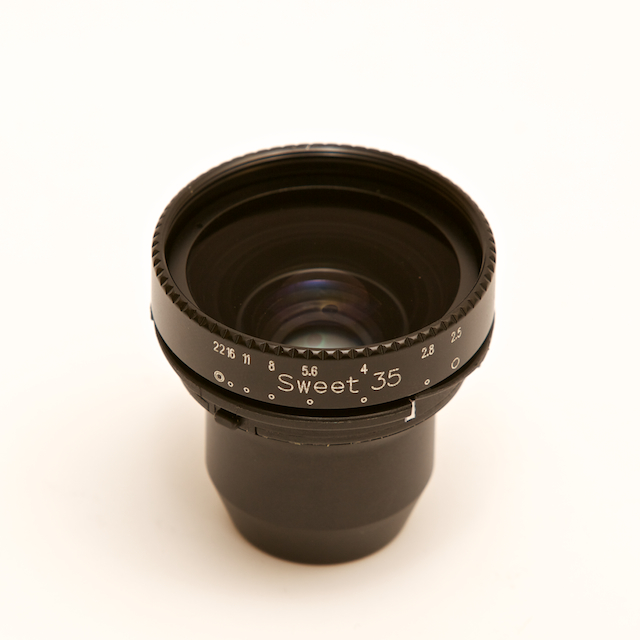
It’s here.  This, more than any other Lensbaby optic I’ve personally used, changes the Lensbaby from a fun tool, into a productive, creative asset.  Not that any of the other Lensbaby optics are bad, quite the contrary, I think that the Lensbaby system is and has always been a wonderful addition to my photographic arsenal, it’s just that up until now, one big challenge with any of the Lensbaby optics has been the inability to alter the size of the sweet spot via aperture adjustment quickly on the fly…  Now, you can bring all of the cool, selective focus effects into concert with the adaptability and exposure tuning qualities of a more standard lens.  Read on for a quick video and image samples…

Continue reading

*Lo-Fi, you know you want to.

I received an email the other day from a contact I’d made while doing the review posts for Alien Skin letting me know they had a new desktop app to process jpeg images in a fun and creative way.  The app is called Lo-Fi, and it is AWESOME!  Having just recently posted a couple of my tricks to age and vintage-i-fy digital images, I have been in a post production, digital file aging mood and this app is a quick and easy way to get a huge variety of looks.  Read on for links and images…

Continue reading

*Sony NEX5 + Lensbaby Tilt Transformer = Unadulterated Fun

*Firstly, thank you to Lensbaby and Sony for the early Christmas gift!  Being a micro 4/3 man primarily when it comes to my compact MILC camera system of choice, I would be lying if I said I wasn’t very curious about the new NEX cameras.  My experience with the NEX5 prior to this was limited to over the counter tinkering and parking lot shooting.  I will do a more in depth review of the NEX5 vs. the GF1 soon as the NEX5 both confirmed some of my doubts and opened my eyes to it as a viable choice for those looking into a small mirrorless interchangeable lens compact camera.  Combined with a Lensbaby Tilt Transformer and Composer front, I feel it provides NEX system users an easy, affordable and fun way to greatly diversify the NEX system.

Continue reading